
Sippd Coffeely
NathanPhamFood & Drink
0.00.00 Reviews
- Version
- 1.1.5
- Installs
- 10.00K
- Age Rating
- Everyone
Screenshots
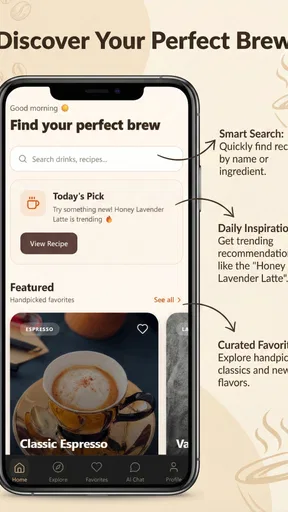
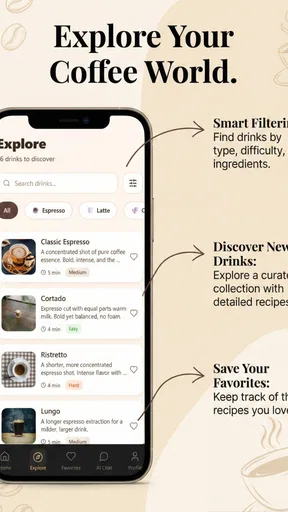
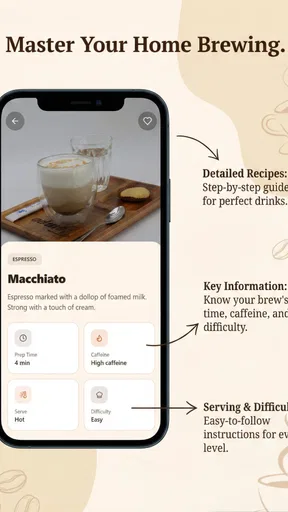
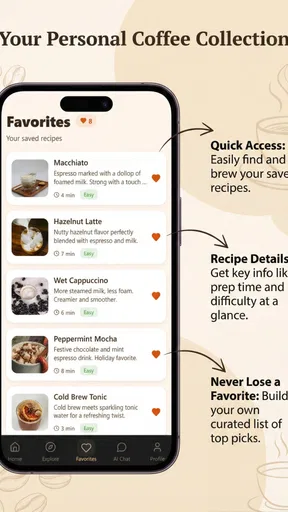
Our Review of Sippd Coffeely
 Analysis by Appyee
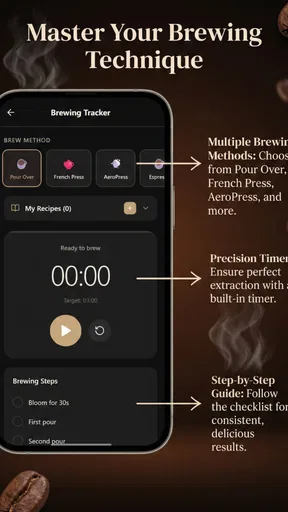
I approached Sippd Coffeely as a coffee companion rather than another recipe catalog. Its appeal is easy to understand: it brings an interactive brewing timer, custom recipes, and an AI assistant into one Food & Drink app. In everyday use, that combination can make a manual coffee routine feel more deliberate without requiring a separate timer, notebook, and search session.
My overall impression is cautious but positive. The app is most interesting for people who already enjoy adjusting coffee variables and want a convenient place to experiment. It is less compelling for someone who only wants a quick cup with no setup, or for anyone who expects an AI tool to replace practical brewing judgment. The useful question is not whether it contains coffee tools, but whether those tools give you enough control to justify adding another app to your routine.
A coffee tool built for experimentation
The central idea is straightforward: you can use the timer while brewing, save or shape recipes, and ask the assistant for help when you are unsure what to change. That creates a more connected workflow than using a generic stopwatch beside a recipe written elsewhere. I found that especially helpful when a brew needed several pours or pauses, because the timer kept my attention on the process instead of making me remember each step.
The developer is NathanPham, and the app is free to install. It is rated for Everyone, which makes the presentation approachable for beginners as well as experienced home brewers. The current release is version 1.1.5, and it runs on Android 7.0 or later. Those details make it accessible to many older devices, although the experience will still depend on how comfortably your phone handles an active timer and any assistant interaction.
Its audience is fairly specific. If you like comparing grind settings, water amounts, pouring patterns, or brew times, the custom-recipe side can become a useful record of what you tried. If you simply follow one familiar method every morning, the timer may be the only part you use regularly. That is not a flaw, but it is worth recognizing before treating the app as an essential purchase.
What the timer changes in a real morning
A realistic use case is a rushed weekday brew. I can imagine weighing coffee, opening a saved recipe, and starting the timer as soon as water touches the grounds. Instead of checking a wall clock or switching between a recipe page and a stopwatch, the brewing sequence stays in one place. That reduces small interruptions, which matter when the coffee bed needs attention at a particular moment.
The timer is also useful for learning consistency. A first attempt may feel approximate, but repeating the same sequence gives you a clearer basis for judging the result. If the cup tastes weak, you can change one part of the recipe next time rather than changing everything at once. This is where the app offers more value than a basic stopwatch: it encourages a repeatable process rather than merely counting seconds.
There is a trade-off, though. A timer cannot make a recipe accurate if the underlying instructions are vague or if the user skips important preparation. It also cannot compensate for a grinder that produces an uneven result, water that tastes unpleasant, or a scale that is difficult to read. I would use the timer as a structure for brewing, not as proof that every cup is being prepared correctly.
Custom recipes are more useful when treated like experiments
The custom-recipe function is where I see the strongest long-term potential. Instead of searching for a new method every time, I would create a starting recipe and adjust one variable per attempt. For example, I might keep the coffee amount and water amount stable while changing the timing of a pour. That makes the tasting result easier to interpret and prevents the common mistake of altering grind, ratio, temperature, and pouring style simultaneously.
A practical habit is to give each recipe a clear purpose rather than creating many nearly identical entries. One recipe could be your dependable morning method, another could be an experiment for a lighter roast, and a third could be reserved for a larger serving. This keeps the app from becoming a confusing shelf of duplicates. The benefit comes from organization, not from collecting recipes for its own sake.
I would also avoid treating a saved recipe as permanent. Coffee changes with freshness, roast style, storage, and equipment. A method that works beautifully one week may need a small adjustment later. The app can help you preserve the steps you used, but your taste remains the final test. That distinction is important: the recipe record supports better decisions, while it does not guarantee a particular flavor.
Another useful workflow is to make a small note immediately after drinking rather than relying on memory. Even a short description such as “bright but thin” or “sweet with a dry finish” can guide the next adjustment. The most valuable custom recipe is therefore not necessarily the most detailed one; it is the one that helps you connect a brewing change with a sensory result.
Using the AI assistant without surrendering judgment
The AI assistant adds a conversational layer that can be helpful when you know the problem but not the next step. A beginner might ask how to respond to a bitter cup, while a more experienced brewer might use it to think through a change in timing or grind. I like this format because it lowers the barrier to asking questions that can otherwise lead to a long search through unrelated coffee advice.
Still, I would treat its suggestions as starting points rather than instructions that deserve automatic trust. Coffee advice often depends on equipment, bean style, water, serving size, and personal taste. A recommendation that sounds sensible in isolation may not fit your brewer or your current recipe. The best way to use the assistant is to ask focused questions, change one variable, and compare the outcome with your previous cup.
There is also a privacy-sensitive moment whenever a user enters information into an AI feature. I would avoid typing anything unnecessary, especially personal details that have no connection to brewing. For ordinary coffee questions, keep the conversation limited to the recipe, equipment, and taste issue you are trying to solve. That is a sensible user-controlled boundary even when the question itself feels harmless.
The assistant is not a replacement for tasting. If it recommends a finer grind, the cup may become stronger but also more bitter; if it suggests more water, the result may become cleaner but less concentrated. I would use its advice as a controlled experiment: record the change, brew carefully, and decide for yourself whether the result improved.
Trust begins with visible choices
For an app that combines recipes with an AI feature, I pay attention to the moments where the user decides what to enter, save, or share. The safest approach is simple: provide only the brewing information needed for the task, review any prompts before accepting them, and avoid treating convenience as a reason to disclose more than necessary. That gives you a practical way to stay in control while still using the app’s main tools.
I would also check the app’s permission prompts as they appear and consider whether each one makes sense for the action I am trying to perform. A timer and recipe workflow should be judged by what the app visibly asks the phone to access, not by assumptions about what it might do. If a prompt feels unrelated to brewing, I would pause and decide whether the feature is worth granting that access.
Account control matters in the same way. If the app presents sign-in, profile, or saved-content choices, I would read those screens rather than tapping through automatically. I prefer using the smallest amount of account information needed for the features I actually want. I would also review any available controls for saved recipes or assistant conversations before building a large personal history inside the app.
These habits are not reasons to avoid the application. They are ways to evaluate it honestly. The app’s strongest trust signal, in my view, is not a slogan about privacy; it is whether the interface gives people understandable choices at the points where data or permissions might matter. I would make that assessment directly during setup and while using the assistant.
Where the free model deserves attention
The app is free, which makes it easy to try without committing money at the beginning. There are in-app purchases ranging from ten cents to $9.99 per item, so I would pay attention to purchase screens and confirm what each optional item provides before approving anything. A free download can be a good way to test whether the timer and recipe workflow fit your habits, but it does not automatically mean every part of the experience is included at no cost.
For me, the right approach would be to use the basic workflow first: create a recipe, run a brew, and decide whether the app actually improves consistency. If those actions already feel useful, an optional purchase may be easier to evaluate on its own merits. If the core routine feels awkward, paying for additional convenience is unlikely to solve the underlying mismatch.
Parents and younger users should find the Everyone rating reassuring from a content perspective, but that does not remove the need for normal purchase awareness. On a shared device, I would keep purchase approval under the account holder’s control. That is particularly sensible when an app includes optional digital items with different prices.
How it compares with familiar alternatives
Compared with a generic stopwatch, Sippd Coffeely offers a more coffee-specific workflow. A stopwatch is faster to open and may be all you need for a simple recipe, but it does not give the same sense of keeping a method together with the timing process. If you already maintain recipes in a notebook, the app’s advantage depends on whether an on-screen timer and assistant are more convenient than your existing system.
Compared with a broad recipe website, this app feels more focused on the act of brewing rather than browsing. Websites are better when you want a wide range of cooking ideas or detailed background reading. Here, the value is in returning to a repeatable coffee process. I would choose the app for active brewing and a website for broader research.
Compared with a dedicated coffee scale or brewer with built-in guidance, the app is more flexible but less physically integrated. It can organize the process on a phone, yet it cannot directly measure the coffee or water unless you do that with separate equipment. Someone seeking automation should look at hardware designed for that purpose. Someone who wants a low-cost digital companion for manual brewing may find this balance more appealing.
The AI feature also changes the comparison. A normal recipe notebook does not answer questions, but it is predictable and keeps your information under your own routine. The assistant can help when you are stuck, while also requiring more careful judgment about the advice you follow and the details you type. That is a genuine trade-off rather than a simple upgrade.
Small frictions that can affect regular use
The first friction is dependence on a phone during a hands-on task. Brewing coffee already involves a kettle, grounds, a brewer, and often a scale. Adding a screen can be helpful, but it can also make the routine feel busier. If you dislike touching a phone near water or coffee grounds, a physical timer may remain the better choice.
The second is the temptation to over-optimize. An app with custom recipes and an assistant can encourage endless adjustments when the real solution is simply using a recipe consistently for a few brews. I would set a limit: change one thing, taste the result, and keep the better version. Without that discipline, the app may turn a relaxing ritual into a spreadsheet-like project.
The third is that conversational guidance can sound more certain than the situation deserves. I would be especially careful with advice that appears universal. Brewing is full of exceptions, and personal preference matters. The assistant is most useful when it helps me frame an experiment, not when I let it decide what a good cup must taste like.
There is also a learning curve in deciding how much detail to put into a custom recipe. Too little information makes later comparison difficult; too much information can make setup tedious. I would start with only the steps that affect timing and taste, then add detail when a repeated problem shows that I need it. That keeps the app practical instead of turning recipe entry into a chore.
Who should install it, and who should pass
I would recommend trying it if you brew manually, enjoy comparing results, and want one place for a timer and adjustable methods. It is particularly suitable for a beginner who wants guidance without immediately buying specialized brewing software, as well as for an enthusiast who wants a lightweight record of experiments. The free entry point makes that trial relatively easy, provided you remain attentive to optional purchases.
I would be less likely to recommend it to someone who drinks instant coffee, uses a fully automatic machine, or never changes a familiar routine. Those users may gain little from custom recipes and an AI assistant. I would also suggest skipping it if you want a completely screen-free ritual or if you prefer a paper notebook because it feels more personal and dependable.
People who expect precise hardware control should set their expectations carefully. The app can organize decisions and timing, but it does not replace a scale, grinder, kettle, or brewer. Its role is coordination and guidance. That is enough for some routines, but not for users looking for end-to-end automation.
My considered verdict
Sippd Coffeely is a focused coffee app with a sensible combination of timing, recipe customization, and conversational help. I appreciate that its usefulness can grow gradually: a beginner can start with the timer, while a more curious brewer can build a method library and use the assistant to plan controlled changes. The most rewarding results come from using it as a record of experiments rather than as a source of unquestionable answers.
My recommendation is to begin with one everyday recipe and test the complete workflow for several brews. Notice whether the timer reduces interruptions, whether saved steps make repetition easier, and whether the assistant gives suggestions you can evaluate sensibly. Keep personal information out of unnecessary conversations, review permission and account prompts, and examine optional purchase screens before confirming them.
The app earns its place when it makes your coffee routine clearer, not merely more complicated. For manual brewers who want structure without investing in specialized hardware, it is worth exploring. For people who want speed, silence, or total automation, a basic timer or built-in machine controls may remain the better fit. That distinction is what makes this a useful but not universal recommendation.
Verdict
Strengths of Sippd Coffeely
- Helps organize coffee choices by roast, origin, and flavor profile.
- Useful for discovering new coffees beyond familiar supermarket brands.
- Personal tasting notes make it easier to remember favorite beans.
- Can support more mindful coffee shopping and brewing decisions.
- A convenient reference for comparing coffees in one place.
Limitations of Sippd Coffeely
- Its usefulness depends on having enough coffees and details in the database.
- Flavor descriptions may feel subjective and differ from your own palate.
- Some features may require creating an account or sharing preferences.
- Coffee information can become outdated as products and availability change.
- Less useful for users who only drink a few familiar coffee brands.
Similar Picks in This Category
View All
Rappi: Food Delivery, Grocery
Rappi, Inc - Delivery3.5

McDonald’s: Cupons e Delivery
Arcos Dorados4.3

Swiggy: Food Instamart Dineout
Swiggy4.7

Blinkit: Groceries & more
Blinkit4.8

foodpanda: food & groceries
Foodpanda GmbH a subsidiary of Delivery Hero SE4.0

Zomato: Food Delivery & Dining
Zomato4.7
Frequently Asked Questions
What is Sippd Coffeely, and what can I use it for?
Sippd Coffeely is a coffee-focused app designed to help users discover, explore, and keep track of coffee-related experiences. Depending on the available features, you may be able to browse coffee options, learn more about drinks or cafés, save favorites, and organize your preferences. It is most useful for coffee lovers who want a convenient digital companion rather than a full replacement for ordering directly from a café.
Is Sippd Coffeely free to download and use?
Before downloading Sippd Coffeely, it is worth checking the current listing in the Google Play Store or Apple App Store because pricing and available features can change. The app may be free to install while offering optional purchases, subscriptions, or premium tools. Review the in-app purchase details, trial terms, and renewal conditions carefully so you understand which features are included without payment.
Does Sippd Coffeely work on both Android and iPhone?
Sippd Coffeely may be available for Android and iOS, but compatibility can depend on your device model, operating-system version, and regional availability. Check the official store page before installing to confirm the supported platform and minimum requirements. Keeping your phone updated can also help prevent installation problems, crashes, or missing features caused by using an older operating-system version.
Does Sippd Coffeely require an account or access to my location?
Some features in Sippd Coffeely may work without registration, while others can require an account to save preferences, synchronize information, or personalize recommendations. Location access may also be requested if the app helps you find nearby coffee shops or relevant places. You should review each permission request and allow only the access you consider necessary for the features you plan to use.
Is Sippd Coffeely worth downloading for everyday coffee use?
Sippd Coffeely can be worthwhile if you enjoy discovering coffee, recording preferences, or keeping coffee-related information organized in one place. Its value depends on how complete its local listings, recommendations, and tracking tools are in your area. Casual users may find it simple and convenient, while experienced coffee enthusiasts should compare its available features with specialized café, review, or coffee-brewing apps before committing.
